Detect a fake
invoice
An edited invoice still reads perfectly. Holofin recomputes the totals, compares the IBAN with the rest of the case and examines the file itself, before the money leaves.
Invoice
14 October · EXAMPLE WORKS LTD
The problem
Four ways
to fake an invoice.
An invoice triggers a payment, a claim or a drawdown. Each kind of fake is caught a different way, and no single check catches all four.
The edited invoice
A real invoice with the amount raised in a PDF editor.
Caught by recomputed totals
The fabricated invoice
Made from scratch, for work that nothing else in the case supports.
Caught by case comparison
The swapped IBAN
A genuine supplier's invoice with the fraudster's account in place of theirs.
Caught by IBAN vs bank details
The recycled invoice
The same invoice presented twice, sometimes rescanned to hide it.
Caught by duplicate detection
How Holofin checks it
Five checks,
from proof to clue.
They are independent and never blended into one score: every alert says which check fired, on which line, with the two values it compared.
- 01
The totals recomputed
The net total, the VAT and the total due are redone from the values read on the invoice. An invoice edited in one place breaks that sum, and the alert names the line that no longer follows.
strong
What it reads
- Net total
- VAT rate
- VAT amount
- Total due
- 02
The IBAN and the rest of the case
The IBAN's check digits are verified, then the account is compared with the bank details in the case. The supplier and the amounts are matched against the quote or the purchase order when they are attached.
strong
What it reads
- IBAN
- Supplier
- Amounts
- Purchase order
- Bank details
- 03
The invoice seen before
The same document in another case, or the same page repeated in a file, even after a rescan or a crop. Medium, because a resend can be an honest mistake.
medium
What it reads
- Document
- Pages
- Earlier cases
- 04
Edits on scans and photos
Holograin, our model trained on financial documents, detects a page redrawn by an image model. The image is also analysed region by region: a pasted figure, a cloned area, a white patch.
How Holograin works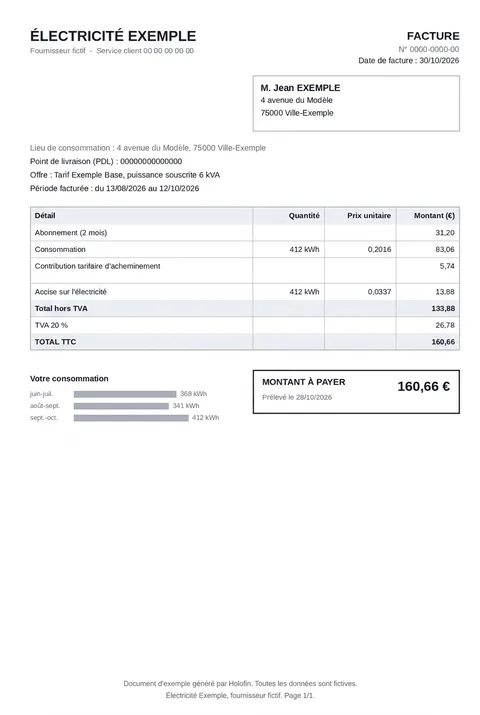 AI detected96/100
A fictitious document after one prompt to an image model, as Holograin scored it. - 05
The file itself
Modification dates, a PDF editor in the history, hidden text, editing remnants, even when the metadata looks clean. These clues say where to look and never refuse an invoice on their own, because a genuine file re-saved in good faith shows them too.
What it reads
- Metadata
- Edit history
- Overlaid text
- Embedded fonts
File analysis
How to tell
if a PDF invoice was edited.
Clean metadata proves nothing: the software and the dates can be rewritten in a few clicks. The file keeps other traces that never show on screen, like the old amount left under the new one. They say where to look; the amounts and the rest of the case settle it.
| Element | What is checked | What raises a flag |
|---|---|---|
| Software | The PDF's producer and creator | A PDF editor or an online converter in the history |
| Dates | File creation and modification | A modification after the creation date |
| Revisions | Versions saved in the file | An added version that changes a page, a broken signature |
| Text | All the text in the file, even what is never displayed | The old amount still there: under a box, transparent, off the page |
| Structure | The PDF's internal objects, displayed or not | Orphan objects left by an edit |
| Fonts | Embedded fonts, line by line | A font used on the total and nowhere else |
| Images | Regions of a scan or a photo | A pasted figure, a cloned area, a white patch |
Use cases
Wherever an invoice
triggers a payment.
Asset finance
The price and the seller of the financed asset, before funds are released.
Invoice finance
An invoice assigned twice, spotted before it is funded.
Insurance claims
Repair quotes and invoices attached to a claim.
Accounts payable
The supplier's IBAN checked before payment, for invoices arriving as PDFs.
Your fields, your rules
Invoices differ, so we set up the fields to extract and the rules to apply with you, once. Then send the invoice or the whole case by API, upload portal or SFTP; you get back the extracted fields and the signals, with the page and line of every value.
Invoice rules, in Hololang
ASSERT @invoice.total == @invoice.net_total + @invoice.vat
VALIDATE @invoice.iban FORMAT IBAN
ASSERT @invoice.iban == @bank_details.iban
ASSERT @invoice.total == @purchase_order.total
FAQ
Fake invoices
Other documents
Test Holofin on your invoices
Send us real invoices, including the fakes you already caught. We return the signals document by document, and what we missed.