Detect a fake
receipt
An image model now draws a receipt from one sentence, and a photo editor changes a total in seconds. Holofin recomputes every receipt, checks it against the claim and reads where the file came from.
EXAMPLE BISTRO
12 Market Street
14 Mar 2026 · 12:47 · Table 6
The problem
Four ways
to fake a receipt.
Expense reports, insurance claims, warranty and cashback requests all rest on a receipt, and a receipt is the easiest document to fake: small, unsigned, printed on paper that fades. Each kind of fake is caught a different way.
The edited photo
A real receipt with the total raised in a photo editor, or by an app asked to change one figure.
Caught by recomputed total
The AI-made receipt
Drawn by an image model from one sentence, with a real merchant's name and a creased-paper look.
Caught by Holograin
The edited e-receipt
A PDF receipt from a shop or an app, with a new figure laid over the old one.
Caught by file analysis
The receipt for something else
Genuine and untouched, but not what is claimed: another amount, another day, another card.
Caught by receipt vs claim
How Holofin checks it
Six checks,
from proof to clue.
They are independent and never blended into one score: every alert says which check fired, on which line, with the two values it compared.
- 01
The receipt recomputed
The lines, the subtotal, the tax at its printed rate, the tip, the total, the cash handed over and the change are redone from the values read on the receipt. An edited figure breaks the sum, and image models still slip on it: a tax that is not its rate, lines that do not add up to the subtotal.
strong
37.00 +2 x Lunch menu4.50 +1 x Mineral water4.40 +2 x Espresso45.90 =Subtotal printed 45.90 ✓4.59 +10% of 45.90 ✓50.49 =Total printed 80.49 ✗ - 02
The receipt against the claim
The amount, the currency and the date claimed are compared with the receipt, then the receipt with the rest of the file: the dates and the city of the trip, the card's last four digits against the company card, the number of guests against the attendees. A genuine receipt behind a false claim is caught here.
strong
What it reads
- Amount claimed
- Currency
- Date
- Merchant city
- Card digits
- Guests
- 03
Receipts drawn or redrawn by AI
Holograin, our model trained on financial documents, scores every receipt photo and scan for the texture an image model leaves in the pixels, whether it drew the whole receipt or redrew one figure on a real one. Its score is one signal among the others: on its own it asks for a review, never a refusal.
How Holograin worksAI re-rendered71/1000threshold100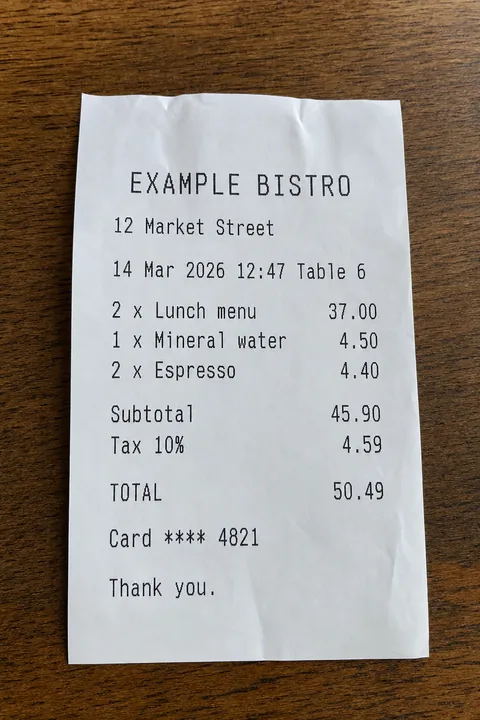
A fictitious document after one prompt to an image model, as Holograin scored it. - 04
Where the image came from
Several AI image tools sign what they make: a content credential (C2PA) or a source type saying the picture was generated, and some generators write their name into the file. Holofin reads them on the original upload, before any conversion. A screenshot or a messaging app strips them, so their absence proves nothing; their presence is proof.
strong
Read from the uploaded file
AI generated- Content credentials
- Present, signature valid
- Action
- c2pa.created
- Source type
- trainedAlgorithmicMedia
- Means
- The picture was made by a generative model, not taken by a camera.
Illustration. A screenshot or a messaging app removes this record, so its absence proves nothing.
- 05
The photo's own traces
A phone stores a small preview with each photo. When the picture is edited and the preview is not, the two no longer match, and the alert shows both. The app that last saved the photo is noted as context: a crop in a phone's gallery is not fraud.
medium
What it reads
- Camera preview
- Editing software
- Capture date
- Crop
- 06
The e-receipt file
For a receipt sent as a PDF: the software that wrote it, modification dates, saved revisions, text hidden under the visible total, a font used on one line only. These clues say where to look and never refuse a receipt on their own, because a genuine file re-saved in good faith shows them too.
What it reads
- Producer
- Dates
- Revisions
- Hidden text
- Embedded fonts
Receipt analysis
How to tell
if a receipt was edited.
A receipt has no seal and no registry entry, so the proof comes from inside it and from the claim around it. The file adds clues on top: they say where to look; the arithmetic and the claim settle it.
| Element | What is checked | What raises a flag |
|---|---|---|
| Arithmetic | Lines, subtotal, tax, tip, total, change | A total that is not the lines plus the tax |
| Pixels | The texture of the image, scored by Holograin | The trace an image model leaves when it draws or redraws a receipt |
| Tax | The tax against its printed rate | A tax that is not its rate of the subtotal |
| Claim | Amount, currency, date, card, guests | A receipt for 50.49 claimed as 80.49 |
| Provenance | Content credentials and generator metadata | A record saying the image was generated by AI |
| Camera preview | The preview the phone stored with the photo | A preview that no longer matches the picture |
| Software | The app that last saved the image or the PDF | An image or PDF editor, as context only |
| PDF history | Dates, revisions, text under the text | The old total still in the file |
Use cases
Wherever a receipt
is the proof.
Expense software
Receipts checked by API as they are submitted, with the signals shown beside the expense.
Finance and audit teams
Expense reports reviewed by exception: the receipts with a signal first.
Insurance claims
Proof of purchase and repair receipts attached to a claim.
Warranty and cashback
The proof of purchase behind a refund, a rebate or a reward.
FAQ
Fake receipts
Other documents
Test Holofin on your receipts
Send us real receipts, including the fakes you already caught. We return the signals receipt by receipt, and what we missed.