
Benchmark
Best OCR for financial documents in 2026
Five OCR engines, 47 scanned bank statements, 492 amounts. We counted every amount each engine read.
 By Holofin Research
Updated 8 min read
Written by Holofin, which builds Hologlyph. Every engine ran on the same scans and was scored by the same code. How we checked
Hologlyph · 491 / 492
99.8%
RapidOCR · 489 / 492
99.4%
docTR · 488 / 492
99.2%
EasyOCR · 456 / 492
92.7%
Tesseract · 437 / 492
88.8%
On this page
Hologlyph, the OCR Holofin builds, read 491 of 492 amounts on 47 scanned bank statements and read 46 of 47 statements in full. RapidOCR and docTR, both open source, came close with 489 and 488. EasyOCR missed 36 amounts and Tesseract 55, about 1 in 9.
Key takeaways
- On scans, the five engines read between 88.8% and 99.8% of the amounts.
- RapidOCR and docTR are the best open-source choices for amounts.
- The dangerous errors are misreads that still look like valid amounts.
Best OCR for bank statements: the ranking
We rank by the share of amounts read, because an amount is what a credit analyst, an accountant or a fraud team acts on. A statement counts as read in full when every one of its amounts was read.
| # | Engine | Amounts read | Statements read in full | Seconds per page | Open source | Best for |
|---|---|---|---|---|---|---|
| 1 |  Hologlyph (Holofin) | 491 / 492 | 46 / 47 | 0.5 | No | Financial documents |
| 2 |  RapidOCR 1.4.4 | 489 / 492 | 44 / 47 | 5.7 | Apache-2.0 | Numbers, no PyTorch |
| 3 |  docTR 1.0.1 | 488 / 492 | 45 / 47 | 2.9 | Apache-2.0 | Word positions |
| 4 | EasyOCR 1.7.2 | 456 / 492 | 24 / 47 | 7.6 | Apache-2.0 | Many languages |
| 5 | Tesseract 5.3.4 | 437 / 492 | 33 / 47 | 1.1 | Apache-2.0 | Clean digital pages |
Dates read: Hologlyph, RapidOCR and docTR 457 of 492, EasyOCR 453, Tesseract 441. Dates top out at 457 because that is all the PDF's own text layer gives up: some statements print a date once for a group of transactions, or spell the month out.
How we tested
The statements. 47 bank statements from 47 banks, one per bank: French banks such as BNP Paribas, Société Générale, Crédit Agricole and La Banque Postale, German and Austrian banks, and the neobanks a lender actually sees (Qonto, Revolut, Wise, bunq, Shine, PayPal, SumUp). 93 pages in all, in French, German and English. Every statement was anonymized before the test: names, addresses and account numbers replaced, the table layout left as it was.
The scans. Each page was rendered at 150 dpi in greyscale, turned by 0.8 degrees, blurred slightly, given sensor noise and saved as a JPEG at quality 35. That is what a branch copier emails, and it is what OCR exists for.
The answers. 492 transactions, each with its date and amount, checked by hand against the PDF wherever a tested system disagreed with the reference.
The score. For each transaction we look for its amount in what the engine read on that page, digit for digit: 1.234,56, 1 234,56 and 1,234.56 all count, 1234 does not, and each amount found is used once. A date counts when its day and month are there. Every engine ran on CPU, with its default models, and was scored by the same code.
The speed. The same 10 scans, on the same 8 CPU cores, one engine at a time. Hologlyph reads several pages at once; Tesseract reads one page at a time by default, and runs faster if you start several copies.
1. Hologlyph
Holofin · not open source
491 of 492 amounts, 46 of 47 statements in full.
Hologlyph is the OCR engine Holofin builds for the documents it reads every day: bank statements, financial statements, ID documents and the scans that come with them.
On this test it read every amount the PDF's own text layer holds (the one it missed is missing from the text layer too), and it was the fastest of the five. A fair warning: Hologlyph is trained on financial documents, so the layouts of these 47 statements may be familiar to it.
Best for: Financial documents where every amount has to be right.
2. RapidOCR 1.4.4
Apache-2.0 · CPU, ONNX Runtime · PP-OCRv4 models
489 of 492 amounts, 44 of 47 statements in full.
RapidOCR packages Baidu's PP-OCRv4 models in ONNX, so it installs with pip and runs on CPU with no deep-learning framework. It reads whole lines at once, which works well on numbers. The cost is in the words: on Latin text it often drops the spaces, so RELEVE DE VOTRE COMPTE comes back as RELEVEDEVOTRECOMPTE.
It also glues neighbours together. On one Austrian statement it read the booking date and the amount as one string, 24.12.202315.000,00EUR. A parser that reads that as one number gets more than two hundred million euros.
Best for: CPU pipelines with no deep-learning framework, where numbers matter more than words.
3. docTR 1.0.1
Mindee · Apache-2.0 · PyTorch
488 of 492 amounts, 45 of 47 statements in full.
docTR, from Mindee, reads in two stages: a detector finds the words, a recognizer reads them. It returns clean word boxes with their positions, which makes it the easiest of the five to build a table parser on. It needs PyTorch, and it read one more statement in full than RapidOCR while missing one more amount.
Best for: Teams that want word positions and a Python API they can fine-tune.
4. EasyOCR 1.7.2
JaidedAI · Apache-2.0 · PyTorch
456 of 492 amounts, 24 of 47 statements in full.
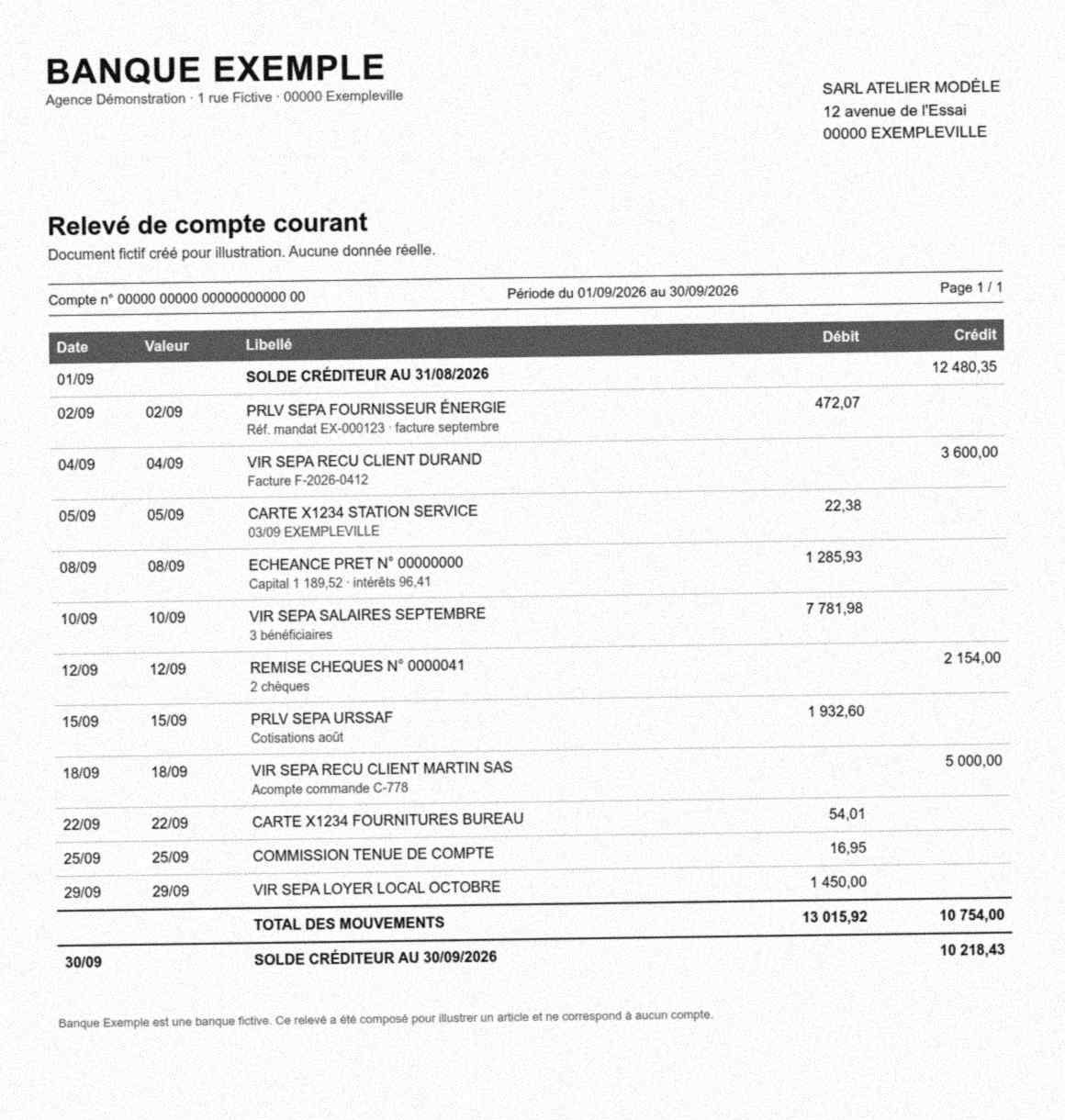
EasyOCR is the friendliest to install and reads more than 80 languages. On scanned statements it read most amounts but mangled the decimals: 7.781,98 became 7.78/,98, 50.000,00 became 50.000,oo/, and 25.000,00 became 25,00o 0o. A zero read as the letter o is a typo in a sentence. In an amount column it is a transaction that no longer parses. It was also the slowest of the five.
Best for: Multilingual text where the occasional character error is fine. Not amounts.
5. Tesseract 5.3.4
Apache-2.0 · C++ · runs anywhere
437 of 492 amounts, 33 of 47 statements in full.
Tesseract is the default answer to "free OCR". On these scans it missed 1 amount in 9. Worse than the misses are the misreads: 472,07 came back as 47207 and 22,38 as 2236. Both look like real amounts. A missing number makes a balance fail loudly. A wrong number makes it fail quietly.
Best for: Clean, born-digital pages and text you will proofread. Not scanned financial documents.
What a read rate does not tell you
Reading is not extracting
An engine that reads every amount has still not told you which amount is the debit, which is the credit and which is the running balance. Statement layouts put dates on one line and amounts on the next, wrap descriptions over three lines and repeat the header on every page. Turning the text into transactions is a separate job, and it is where most extraction errors come from.
A wrong amount looks like a right one
Every misread above is a valid number. 47207 passes every format check a spreadsheet will run. The only thing that catches it is arithmetic: the opening balance plus the transactions must equal the closing balance. If your pipeline does not do that sum, it does not know whether its OCR worked.
OCR reads a forged statement just as well
A perfect OCR reads an edited statement as faithfully as a genuine one. Whether the PDF was modified after the bank produced it, or a page was redrawn by an image model, is a question OCR does not ask.
How to choose an OCR for financial documents
- Test on your own scans, not on clean PDFs: scans are where engines part ways.
- Count amounts, not characters. A 99% character accuracy hides the one character that moves a decimal point.
- Check whether it straightens the page. A copier turns pages by a degree or so, and a skewed line puts the amount on the wrong row.
- Keep the numbers whole. An engine that cuts
15 000,00between its groups, or glues it to the date beside it, hands your parser a different number. - Reconcile after reading. Opening balance plus transactions equals closing balance, or the statement goes to a human.
At Holofin, reading the page is the first step, not the product. Every bank statement is read, turned into transactions and reconciled: the opening balance plus the transactions must equal the closing balance within 0.02 EUR. Every PDF goes through more than 100 forensic fraud checks, documents stay in the EU, and it costs from 0.05 EUR per page.
Sources
- RapidOCR 1.4.4
- docTR 1.0.1
- EasyOCR 1.7.2
- Tesseract 5.3.4
- PaddleOCR (PP-OCRv4)
- Bank statement extraction benchmark
Spotted an error? Write to [email protected] and we will rerun the test and note the change.
Frequently asked questions
What is the best OCR for bank statements?
On our test, Hologlyph read 491 of 492 amounts on 47 scanned statements. Among open-source engines, RapidOCR (489) and docTR (488) were close behind, well ahead of EasyOCR (456) and Tesseract (437).
What is the best open-source OCR for bank statements?
RapidOCR and docTR, both Apache-2.0. RapidOCR read 489 of 492 amounts and needs no deep-learning framework; docTR read 488, read 45 of 47 statements in full and was twice as fast on our CPU test.
Tesseract vs EasyOCR vs docTR: which reads bank statements best?
docTR, by a wide margin: 488 amounts against 456 for EasyOCR and 437 for Tesseract, and 45 statements read in full against 24 and 33. Tesseract was the fastest of the three, at 1.1 seconds per page.
Is Tesseract good enough for financial documents?
For scanned statements, no. It missed 55 of 492 amounts and turned some into different valid-looking numbers, such as 47207 for 472,07.
How accurate is OCR on scanned bank statements?
On our scans, the five engines read between 88.8% and 99.8% of the amounts. Even 99% is not enough on its own: one misread amount in a three-month statement means the balances no longer add up.
Do I need a GPU for OCR?
No. All five engines in this test ran on CPU, and RapidOCR needs no deep-learning framework at all.
Is Hologlyph open source?
No. It is the OCR engine Holofin builds for the documents it processes.
How do I get a result corrected?
Write to [email protected] with the engine, its version and what you measured. We rerun the test, correct the row and move the updated date.
Put Holofin on your own documents.
Every value linked to the page it came from, every PDF checked for tampering, rules checked across the whole file.